Why limit yourself to the rigid logic of a standard programmable relay? By combining a low-cost 8-Channel RS485 Modbus I/O board with Python, you can create a “Mini-PLC” with the processing power of a modern computer. This setup allows for complex math, database logging, and web-connectivity that traditional budget PLCs simply cannot handle.
⚠️ HIGH-RISK SAFETY WARNING
Interfacing PC hardware with high-voltage industrial boards carries a significant risk of permanent equipment damage or personal injury.
- Expert Only: This guide is for advanced users who understand wiring, DC/AC voltages, and current limits.
- Hardware Risk: A single wiring error can send 24V or 220V back through your USB port, instantly destroying your motherboard.
- Best Practice: Use an old computer or a Raspberry Pi for testing to protect your primary workstation.
🔌 Hardware Connection & Wiring
Before writing code, we must establish a physical data link. Below is the basic wiring between our USB-RS485 converter and the I/O module.
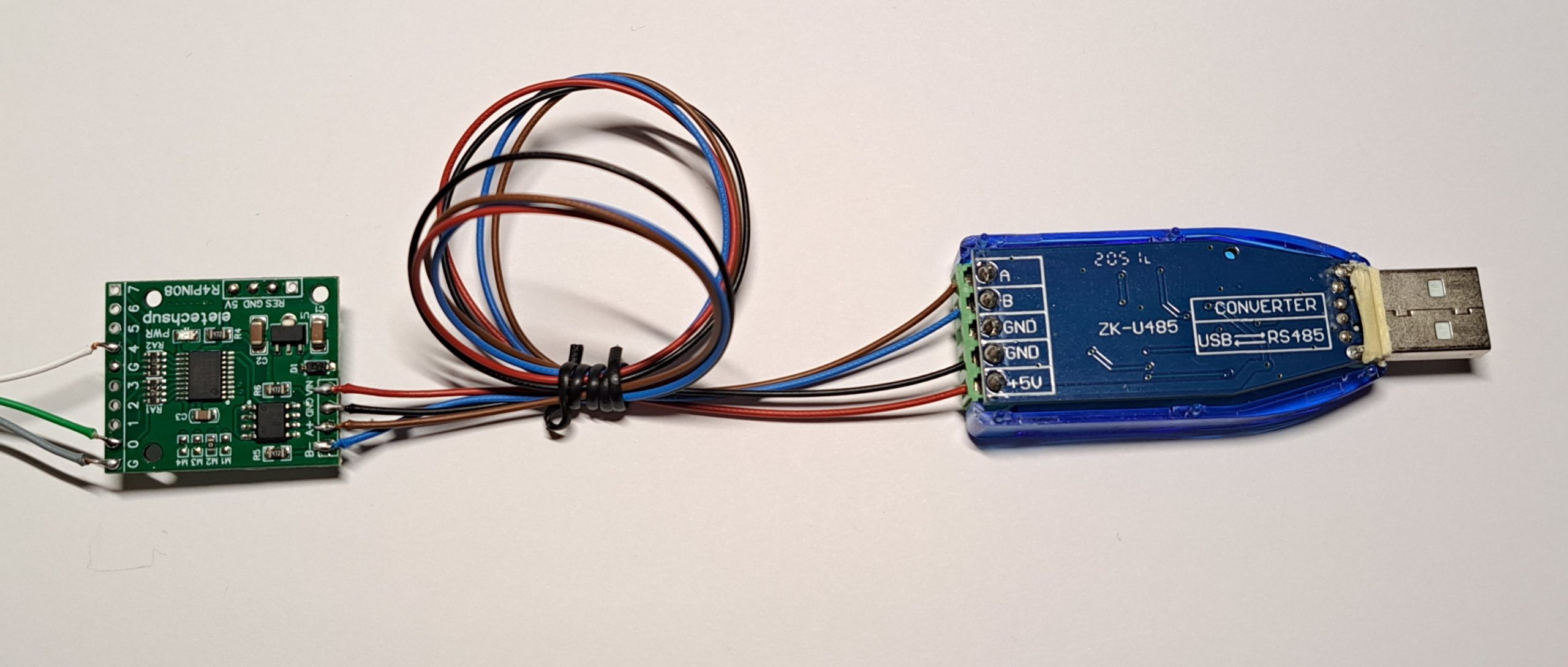
Figure 1: Establishing the RS485 Data Link (A+ to A+ / B- to B-) power (+5V and GND from the USB red-black)
Note on Hardware Quality: These specific modules are intended for hobbyists and learning environments. They are excellent for mastering Modbus RTU at a low cost. However, they lack the extreme isolation and certified safety ratings found in professional industrial gear (like Beckhoff or akYtec). There is a reason professional modules cost more—they are designed for 24/7 safety in harsh factory conditions.
Related Learning:
• Ensure your power is safe by following our Safety Bench Setup Guide.
• Full Technical Breakdown of the R4PIN08 I/O Expansion Board.
LOGICHOBBYIST PRO-TIP: Always double-check your A and B lines. In the RS485 world, getting these backwards won’t destroy anything, but your code will simply fail to read. If you see “Timeout Errors,” swapping A and B is the first troubleshooting step!
Ready to build the brain?
You have the hardware ready and the safety bench set. Now, it’s time to turn this circuit into a professional, PC-powered PLC using Python and PyQt5.
Step 1: Installing Python & Setting up the Environment